News Update

Free Download VideoPad Video Editor Professional v3.72 Full Version

Pada aplikasi video editor yang saya bagikan kali ini ialah VideoPad Video Editor Pro yang merupakan sebuah applikasi dimana sobat dapat menghapus, menggambungkan bagian-bagian yang ada di suatu video. Selain itu aplikasi ini sobat berguna untuk menyipkan subtitile pada video serta sobat bisa mengedit bagian suara yang ada di suatu video.
VideoPad Video Editor Pro memang di kenal software video editor sederhana yang ringan digunakan saat menggunakan aplikasi ini.


Screen Shoot :


Link Download :


Free Download iSkysoft Video Converter Ultimate 5.3.1.0

iSkysoft Video Converter Ultimate adalah aplikasi dimana dapat membantu sobat dalam merubah format jenis file video satu ke tipe video lain atau file video tersebut dirubah menjadi fornat file audio tertentu. Di aplikasi ini sobat dapat menyesuaikan pilihan memilih tipe atau jenis file yang akan di converter, Seperti untuk smartphone, perangkat game (ps2/3,psp, Wii) atau memilih tipe file biasa.


Link Download  :


Download CyberLink AudioDirector Ultra 4.0.3522.0 Full Version

CyberLink AudioDirector 4 Ultra merupakan sebuah aplikasi editor audio di mana sobat dapat mengedit memotong, bahkan menggabungkan atau yang di sebut mixing, serta dapat recording suara atau audio. Ada beberapa fitur adjust audio dan adust effect bahkan noise gate tool terdapat dalam aplikasi satu ini.


System Requeirement :
  • Intel Core™ i3 530 or equivalent AMD CPU
  • OS Microsoft® Windows® 8/8.1, 7, Vista, XP (32-bit with Service Pack 3)
  • Hardisk space 1 GB
  • RAM 2 GB
Link Download :


Download Wondershare Video Converter Ultimate 7.0.0 Full Version With Patch

Untuk anda yang biasa mengconvert video tentu sudah tidak asing dengan software yang satu ini karena wondersahare video converter ultimate 7.0.0 merupakan salah satu dari 10 converter terbaik.
Wondersahare video converter ultimate 7.0.0 merupakn sebuah software yang berfungsi untuk mengconvert video atau audio ke format lainnya sesuai yang dibutuhkan, misalnya mkv ke mp4 atau ke 3gp atau ke format avi dan lain-lain-lain sesuai yang dibutuhkan dan masih memiliki fungsi lain, namun fungsi utamanya adalah untuk mengconvert.


Screenshot :


Cara Install :
  1. Extract Menggunakan winrar
  2. Install program seperti biasa dan sebelum tekan finish hilangkan terlebih dahulu tanda centang yang ada
  3. Setelah finish, Copy patch didalam folder patch
  4. pastekan di Local C / Program Files / Wondershare / Video Converter Ultimate/
  5. Kemudian jalankan patch dengan cara klik kanan dan run as administrator
  6. Kemudian klik Patch
  7. Selesai
Link Download :


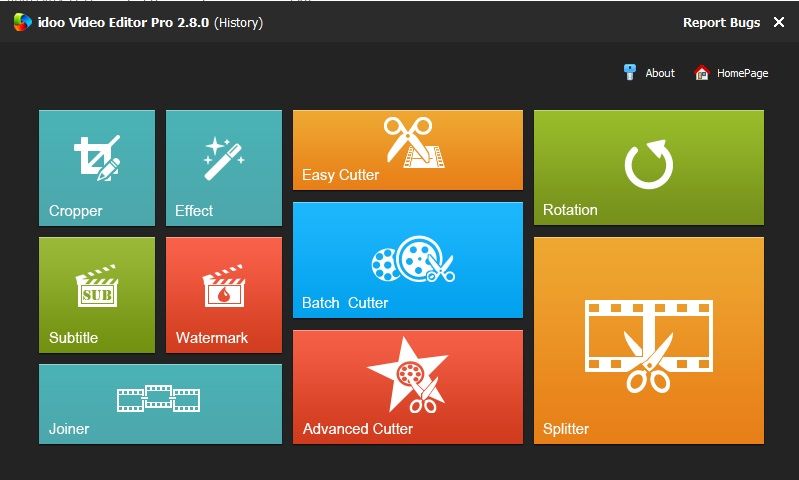
Download idoo Video Editor Pro 2.8.0 Full + Keygen

idoo Video Editor is a professional video editing software with clear interface and user-friendly operation. Its powerful and comprehensive function would bring you high-quality and efficient work experience, as well as perfect audio-visual enjoyment. This software supports most video and audio formats, and possesses powerful conversion function. It can convert your video and audio into any media formats which fit your need, such as files formats for iPhone, Sumsung or any other smartphone, tablet PC, game devices, HD video, network video etc.. The “Effect” function will make your video more vivid.


Screenshoot :

idoo Video Editor Pro 2.8.0 Full+Keygen
Link Download :


Any Video Converter Ultimate 5.5.0 Final Full Keygen

Any Video Converter Ultimate will provide users with an All-in-One DVD ripper, video converter and DVD creator that will help you rip DVD and convert all kinds of video formats including MP4, AVI, RM, RMVB, QT, MOV, 3GP, 3G2, FLV, MPEG-1, MPEG-2, DVR-MS, VOB, MKV, ASF, DivX, OGM to MP4, AVI, WMV, 3GP, 3G2, FLV, MPG and SWF with fast converting speed and excellent video quality, HD AVI, HD MP4 and HD WMV output formats are also available and you can create DVD movie with beautiful and customizable DVD menu directly from various video formats.


Ashampoo Snap 6.0.10 Full Crack

Ashampoo Snap 6 merupakan software yang berfungsi untuk mengambil atau merekam gambar dan video pada layar desktop pc kita. Anda dapat mengambil screenshot maupun merekam aktifivas pada layar desktop dengan kualitas terbaik dan tentunya dengan sangat mudah, di samping berfungsi untuk merekam kegiatan layar desktop, anda pun di mungkinkan untuk mengedit hasil capture serta rekaman video yang anda ambil sebelumnya langsung dengan menggunakan program Ashampoo Snap tanpa sedikitpun menggunakan bantuan dari program pihak ke tiga.

Screenshot

New highlights
  • Restructured tool bars for improved workflow
  • New tools, e.g. Floodfill, BlurPen, Numbering etc.
  • Facebook and YouTube upload
  • Easier accessible configuration options for all tools
  • Improved tools supporting rotation and transparency
  • Delayed and timed capture
  • Menu capture mode for multi-level menus
  • Watermarking for screenshots and captured videos
  • Recording of webcam and microphone

Download

Instalasi
1. Unrar
2. Install Ashampoo Snap
3. Double klik file reg > klik yes / ok
4. Enjoy

Aiseesoft SlideShow Maker 2.1.28 Portable

Aiseesoft SlideShow Maker sangat mudah dan powerful untuk di gunakan membuat video slideshow. Software ini memungkinkan Anda untuk dapat membuat slideshow anda sendiri dari sumber file media yang anda miliki seperti video, foto dan file musik. Sebagai software professional, Aiseesoft SlideShow Maker juga memungkinkan pengguna untuk mengedit serta membuat video atau audio file mereka sendiri dan menyimpannya dalam format MP4, AVI, FLV, SWF, MP3, M4A, AAC dan format populer lainnya.

Screenshot

Features
Make slideshow video
• Create slide show from video/photo/audio files
You could directly import local video/photo files and add audio files as the background music to create slideshow.
• Accept almost all the video/photo/audio formats
All video/audio/photo formats can be accepted by this slideshow maker for you to create your own slideshow files.
• Create any video/audio files
Your own slideshow project could be outputted to any popular video and audio format.
Adjust slideshow effect
• Add text as the subtitle
You can input any text contents as the subtitle of the slide show directly.
• Edit video/photo/audio/text properties
This SlideShow Maker could edit the added source files, such as cropping the video playing region, trimming any video/audio clip and adjusting the output effect to meet your needs.
• Add transition effect
This SlideShow Maker provides you with various transitions inserted between individual source clips.
Easy-to-use SlideShow Maker
• Preview your self-created slideshow project
You can preview the effect of your self-created project before you output it.
• User-friendly interface
Aiseesoft SlideShow Maker possesses a user-friendly interface, which could make all operations so easy that only a few clicks could bring you a perfect slide show.

Download

WonderFox DVD Video Converter 4.8 Full Serial Key


WonderFox DVD Video Converter memberikan pengguna solusi termudah untuk mengkonversi file DVD dan video. Software ini memungkinkan kita untuk mengkonversi file DVD ke dalam format HD / SD video format sesuka hati, anda dapat memanfaatkan software ini untuk berbagai macam keperluan seperti mengedit, menggabungkan beberapa video menjadi satu, membuat klip video, memotong bagian pada video atau menambahkan efek khusus. Modus batch dan encode teknologi membuat kecepatan konversi 30-50x lebih cepat dari software video converter biasa. Terlebih lagi, software ini mendukung Variabel biteate (VBR) yang menawarkan kualitas gambar / grafik yang lebih baik dengan ukuran file yang relatif lebih kecil.

Screenshot

What's new in WonderFox DVD Video Converter 4.8 ?
  • Fixed a bug of sound issues on converted files in some cases.
  • Fixed a bug that no audio on converted files when user chooses non-English language for output.
  • Fixed a bug when user add and convert FLAC file to other audio format. (In most cases, this error results from the incomplete and damaged audio file. Please check the source file first before conversion.)
  • Upgraded operational efficiency on Windows 64-bit.
  • Improved performance of downloading online videos.
  • Fixed a bug that program cannot read thumbnails of source DVD file in some cases. (If thumbnails of DVD file cannot be read, that part of DVD is unable to be selected and converted.)
  • Fixed a bug that program cannot recognize DVD file when user applies external USB DVD-ROM.
  • Newly added “Add Subtitle” option to program.
  • Support adding subtitles you have to source files for output. (Support subtitle files with .SRT and .ASS extension.)
  • Fixed a bug that when convert some DVDs, output language differs from the language user selected.

Download

Instalasi
1. Unrar
2. Install DVD Video Converter kemudian jalankan programnya
3. Klik Register lalu masukan serial key-nya
4. Enjoy

    Watermark Software Video to Picture 3.8 Portable

    Watermark Software Video to Picture mampu mengkonversi hampir semua file video yang sering digunakan ke dalam format gambar seperti: JPG, BMP, GIF, TGA, TIF, PCX, PNG dan ICO. Anda dapat dengan mudah mengkonversi video file berfomat: AVI, MPEG, WMV, DVD ( VOB ), DVR-Ms RM, RMVB, dll untuk di ubah ke dalam bentuk format gambar. Dan, itu juga memungkinkan Anda untuk mengkonversi file video ke dalam bentuk gambar gif animasi.

    Screenshot

    Video to Picture Features
    • Provide two independent output options
    • Video to Picture Converter provide Serial Pictures and Animated GIF to output mode. serial pictures for JPG, BMP, GIF, TGA, TIF, PCX, PNG and ICO images. Animated GIF for GIF only.
    • Accurately control length of time in Video to Picture
    • You can via progress bar and manual input time for control per frame.
    Resize
    • We provide common, you can also input any size. And support three interpolation options:
    • Sawtooth--> strong contrast, distinct picture, but you may lose some details;
    • Sharpen--> Its effect is very good, between smooth and sawtooth, picture is distinct. This is a popular way;
    • Smooth--> Smooth edge without sawtooth, make picture looks vaguer.
    Frame Rate
    • Display total frames in output, you can select X pictures per second for control speed in GIF animation, Video to picture support it only.
    • Video to Picture Converter also a video player
    • Video to Picture formats Supported
    • Input formats: AVI, MPG, MPEG, ASF, WMV, WM, RM, RMVB, VOB, MOV, 3GP, M1V, VOB, DVD(VOB)
    • Output formats: JPEG, GIF, BMP, TIFF, PNG, TGA, ICO, PCX, PDF, JPEG2000, WBMP, PSD, etc

    Download

    Xilisoft AVI MPEG Converter 7.7.3 Build 20131014 Full Patch

    Xilisoft AVI MPEG Converter adalah sebuah software converter yang memungkinkan anda untuk mengkonversi file video AVI, MPEG, WMV, MP4, FLV, MKV, DivX, XviD, MOV, RM, RMVB, M4V, VOB, ASF, 3GP dan masih banyak lagi ke dalam format video AVI, MPEG, MPEG-1, MPEG-2, VOB dan juga sebaliknya. Kelebihan software ini terletak pada kecepatan konversi yang 4x jauh lebih cepat di banding software konversi lainnya, di samping itu Xilisoft AVI MPEG Converter v7.7.3 memiliki beberapa fitur menarik salah satunya fitur penyesuaian size output video yang memungkinkan pengguna untuk menentukan besar file hasil konversi video. hebat bukan ?

    Screenshot

    Features
    High Quality Formats
    Support large numbers of video formats especially the latest HD video formats
      • HD Format
      • Convert ordinary video formats and HD videos (H.264/MPEG-4 AVC, AVCHD).
      • Super High Speed
      • Xilisoft AVI MPEG Converter detects your CPU – dual-core or multi-core, so that it maximizes the conversion speed.
      Split, Compress and Trim top
      Xilisoft AVI MPEG Converter provides complete and accurate options for you to select

      • Classified and Adjustable Output Parameters
      • Output parameters are classified and can be adjusted freely: video codec, video size, bit rate, frame rate, audio codec, channels, etc.
      • Clip a Segment
      • Clip only a certain segment from a video of your choice by setting the file duration and start time.
      • Define Output File Size
      • With the bit rate calculator, you can specify what file size and other file property you want, and the bit rate calculator will do the rest for you.
      • Split File
      • Load a file and split into several small ones as you set the file size or file duration.
      Batch Conversion, Flexible Options top
      With the handy design, you can have a rich and colorful AVI MPEG conversion journey

      • Run in Background
      • Run the converter in background while you do other things on your computer; it would not conflict with other programs or slow down your computer.
      • Batch Conversion
      • Load several files and convert all at the same time, without even slowing your computer down!
      • Preview and Snapshot
      • Provides a built-in resizable player to preview the files (supports 4:3 and 16:9 zoom mode) and allows you to snap your favorite screens anytime.
      • Power Management
      • Allows you to manage your system power in this AVI MPEG converter.
      • Diverse Languages
      • Choose from English, Chinese, German, French, Spanish and Japanese language interfaces.

      Download

      Instalasi
      1. Unrar
      2. Install AVI MPEG Converter
      3. Copy Patch ke direktori instalasi programnya
      4. Run Patch > Click Patch
      5. Run program AVI MPEG Converter
      6. Register dengan sembarang nama dan serial
      7. Enjoy

      CyberLink PowerDirector 12 Full Crack

      CyberLink PowerDirector 12 adalah sebuah software video editor handal yang berguna untuk mengedit video. Software ini memungkinkan anda agar bisa secara bebas mengedit dan mempercantik / memperbagus video yang anda miliki dengan segala kreasi yang anda punya, anda juga dapat memberikan berbagai efek menawan untuk koleksi video kesayangan anda. Di samping itu dengan bantuan CyberLink PowerDirector 12, anda juga dapat membuat file video Non HD dan Non 3D ke dalam format video HD maupun 3D. Pada versi 12 ini terdapat cukup banyak fitur baru yang sangat bagus, apa saja sih fitur baru tersebut ? silahkan anda lihat pada list fitur di bawah.

      Screenshot

      Features
      • The new dimension of video creation
      You like to hold your favorite memories on film and want to share in best quality with others? The new theme designer PowerDirector 12 transforms your video clips and photos in anmierte 3D movies . With the Design Studio tools, you can add stylish effects to your videos in no time.
      • PiP Designer
      Show graphics in videos and edit animations completely comfortable with the timeline interface.
      • Title Designer
      Make tracks with various font types, color adjustments and animated effects individually .
      • Particle Designer
      Make particle effects with their own integrated graphics or animation effects .
      • Menu Designer
      Menus provide still more character and design , with titles , chapters, particles and PiP objects.
      • Simple post without effort
      PowerDirector 12 provides an intuitive user- friendly interface for hobbyists and dedicated editors alike. With more than 100 processing capabilities, you can each processing step as a professional track and control . If you are not familiar with the video editing, you can use the simple editor, and create videos in a few minutes.
      • Powerful editing tools
      Dedicated Cutter will be delighted by the many efficient tools in PowerDirector 12th His productive work environment offers efficient video production and design .
      • 100 -track timeline
      Your creativity has no limits thanks to the 100 -track timeline. Video overlays , PiP Objects , Particle and title for unique visual effects .
      • Precise keyframe control
      Effects within a work surface for easy synchronization on the video timeline. A must-have tool for creating unique effects.
      • media Library
      The size of the preview images in the Media Library can be adjusted to suit as required. Media content are always clearly displayed and easy to find .
      • Chroma Key IMPROVED
      Films in front of a green or blue cloth and hide another video as a background , just like the weather forecast or in Hollywood movies .
      • Animated hand drawing
      Design your own hand - drawn animation with a range of brushes. You can also apply distortion and adjust the speed.
      • Subtitle Room NEW
      Font, color and position of subtitles, adjust as needed. With the intuitive subtitle space can be created quickly and import and output subtitle in SRT format .
      • Finishing in top speed
      True Velocity 4 is our new , much faster 64- bit video processing engine . With OpenCL and multi - GPGPU support, you can make optimal use of the hardware performance of your computer and enjoy ultra- fast rendering .
      • Optimized for Intel AVX 2
      PowerDirector 12 is optimized for AVX2 technology on Intel Core processors 4 Generation ( Haswell ) , for three times faster rendering compared with version 11
      • Hardware acceleration
      PowerDirector 12 is optimized for the latest hardware generation Intel Core technology , AMD APU and NVIDIA GPU technology.
      • SVRT 3
      The Smart Video Rendering Technology ( SVRT ) analyzes a project and then chooses the best output format to speed up production .
      • Multi - GPGPU acceleration
      True Velocity 3 now accelerated rendering your videos by the installed power of multiple graphics chips are combined.

      Download

      CloneDVD 7.0.0.3 Full Crack

      CloneDVD adalah perangkat lunak yang fleksibel dan mudah di gunakan untuk mengkopi / mengkloning file DVD apapun serta mengkonversi file DVD apapun ke dalam bentuk ISO maupun format video populer lainnya seperti: AVI, ASF, MP4 iPod, PSP MP4, 3GP, dll. CloneDVD otomatis menghapus semua perlindungan / proteksi (CSS, RC, RCE, Sony ARccOS UOPs dll) selama proses penyalinan, sehingga memungkinkan anda secara bebas menyalin semua koleksi film DVD Anda. Di samping itu anda juga dapat melakukan beberapa pengeditan video seperti: menyesuaikan contrast, hue, saturation, brightness dan effect.

      Screenshot

      Features
      Copy/Burn/Rip ANY DVD Movie:
      • Remove/decrypt/bypass almost all known DVD copy protections, like CSS, CPPM, RC, RCE, APS, UOPs, ARccOS, RipGuard, etc., to freely copy any DVD
      • Copy all DVD discs to make your DVD clone region-free by decrypting all region protections and RPC-I/RPC-II/RCE region protections automatically during copying
      • Copy DVD by auto removing unnecessary warning screen and watermarks
      1:1 DVD Copy to a Blank DVD Disk:
      • DVD-9 to DVD-5: perfectly auto compress/shrink DVD-9 to DVD-5 safely without any data loss
      • 1:1 DVD Copies: fast transfer DVD-9 to DVD-9 and DVD-5 to DVD-5 of high video&audio qualities
      • DVD-9 to 2 DVD-5: easily and logically split or divide your big DVD-9 disc to 2 stable DVD-5 discs
      Customize DVD Copying Contents:
      • CloneDVD enables you to copy full DVD movie disc to a blank DVD disc, ISO, or other video formats
      • CloneDVD allows you to keep main movie only of a DVD by deleting any unnecessary and unneeded intros, menus, language and sound tracks
      • CloneDVD makes your DVD copy process customizable to rip/convert/copy/burn any chapter or chapters of a DVD disc
      Playable on all Full Range DVD Players and Portable Devices:
      • Convert/rip/burn DVD into ISO image files for easy backup or conveniently and easily playing them on media center
      • Copy DVD to hard drive for playback on your computer or DVD copy in the future
      • Convert DVD to audio for media players, such as, DVD to MP2, DVD to NO3, DVD to AAC, DVD to AC3
      • Transfer DVD to video formats for better view: DVD to AVI, DVD to ASF
      • Convert DVD to MP4 or DVD to 3GP for enjoyment on-the-go: DVD to iPad Mini, DVD to the New iPad, DVD to iPad, DVD to iPhone 5, DVD to iPhone 4S, DVD to iPhone, DVD to iPod, DVD to iPod Touch, DVD to iPhone, DVD to Apple TV, DVD to BlackBerry, DVD to PSP, DVD to 3GP for known mobile phones
      Make Your Unique Movie:
      • DVD Ripper function: extract DVD clips or cut out any part from a DVD disc that you dislike for storage or DVD conversion/copy
      • DVD Cropping: eliminate unwanted areas of the frame of DVD to meet your various display screens
      • DVD Edit: add your own watermark on the movie to make it special and unique
      • Merge/join/combine multiple DVD chapters into a single movie
      • Insert subtitle in preferred language
      • Adjust contrast, hue, saturation, brightness for better video effects
      Easy & Fast:
      • Support iPhone 5 and the New iPad new feature
      • Easily get the original DVD informations including movie picture, name, user rating, release date, more info etc..
      • Synchronize with PSP, iPod, iPod touch, BlackBerry and iPhone
      • One click solution for DVD backup/conversion fast and easily
      • Multiple languages supported such as English, French, Spanish, German, Italian, Japanese, etc
      • Multiple burn engines selectable, external Nero burn engine supported
      • Automatically turn off computer when finished
      • Free minor version upgrade online
      • Free 24 hour online help documentations for reference
      • Lifetime free technical support

      Download

      Instalasi
      1. Unrar
      2. Install CloneDVD
      3. Copy dan paste file ConfigM.dll ke direktori instalasi programnya
      4. Enjoy

      ImTOO DVD to iPad Converter 7.7.2.20130819 Full Patch


      ImTOO DVD to iPad Converter adalah sebuah software professional video converter untuk iPad user. Dengan ini anda dapat me-Rip dan mengkonversi film DVD dengan resolusi 1280x720, 720x480, 640x480 dll untuk di putar pada perangkat iPad yang anda miliki. Anda pun dapat melakukan beberapa hal menarik seperti melakukan split untuk tiap title atau chapter, mengcapture gambar movie, mengkostumisasi parameter audio dan video, preview film DVD, menentukan size output video hasil konversi dan masih banyak lagi yang lainnya.

      Screenshot

      Features
      • Show DVD disc info automatically, such as director, actors/actresses, film name, and studio.
      • Rip one or several DVD titles/chapters, the entire DVD movie, or just a segment from it with subtitle and audio of your choice.
      • Automatically split a DVD title or chapter into several smaller chunks with suitable split duration or size.
      • A variety of parameters to adjust such as bit rate, frame rate, sample rate and channel.
      • Convert a DVD movie into several iPad videos of the same or different formats simultaneously.
      • Specify the size of your output file with the aid of the Bitrate Calculator.
      • Set your system to auto shut down, hibernate, stand by or exit application after a conversion is complete to save time and effort.
      • Run your copy of ImTOO DVD to iPad Converter in the background to free up CPU resources for other applications.
      • Capture images from a DVD movie and save them as JPG, GIF, BMP or PNG format.
      What's new
      • Fully support iPhone 5, iPad mini and iPad 4.
      • Optimized the profile parameters of GPU acceleration.
      • Supports profile parameters: Main, Baseline and High.
      • Supports preset parameters: Ultrafast, Superfast, Veryfast, Faster, Fast, Medium, Slow, Slower.
      • Supports adding cover when output to M4A and AIFF formats.
      • AIFF format supports metadata.
      • Accelerated ACC encoding speed.
      • Fixed bugs.
      • Adopts multi-thread encoding technology which promotes the converting speed of High Definition videos.
      • Optimizes profiles for iPad.
      • Lyric support for MP3 format music.
      • Metadata support for MP4 and M4A formats.
      • Added High Definition video profile for iPad 2.
      • Support more devices like Motorola XOOM and Samsung P1000.

      Download

      Instalasi
      1. Unrar
      2. ImTOO DVD to iPad Converter
      3. Copy patch ke dir instalasi programnya
      4. Run Patch > Apply Patch > kemudian klik open file imfc0.dll
      5. Jalankan program ImTOO DVD to iPad Converter kemudian register dengan sembarang nama dan serial key

      Ashampoo Music Studio 4 v4.1.0.16 Multilingual Portable

      Ashampoo Music Studio 4 Adalah salah satu software yang berfungsi untuk mengekstrak, membakar, mengubah, mengedit dan memperbaiki file audio! Ashampoo Music Studio 4 merupakan aplikasi cerdas dan mudah untuk digunakan. Software ini secara otomatis akan menangani semua pengaturan rumit audio encoding dan decoding serta memungkinkan Anda untuk fokus pada apa yang sebenarnya Anda ingin lakukan - bekerja pada file audio.

      Screenshot

      Features
      • Create
      Digitize your audio and enjoy the everlasting high quality of digital music. Notebook computer, music player or cellphone listen to your favorite music, anywhere any time Transfer your precious music collection to your PC and let Music Studio create the required audio files for you Record your own audio files through any available Windows recording device, e.g. microphone or line in, and process them right in Music Studio. Grab the music right from your favorite movies and create your own ringtones and remixes.

      • Edit
      Take control of your music collection and adjust your songs to your personal needs. Have Music Studio auto-create meaningful file names for your songs. Turn Allegro con brio.mp3 into Beethoven Op. 15 Allegro con brio.mp3 and keep better track of your music collection. Volume too high or too low? Song too long? Audio format wrong. Adjust these settings with ease with Music Studio.

      • Design
      Catalog your music collection and never loose track of your audio discs again. Create beautiful covers for jewel and slim cases or print directly to your discs. Music Studios Cover Editor will have you create stunning artwork in no time.

      • Produce
      Your files are now digitized, converted and modified. It is time to write them to disc, either for storage, easy listening on your CD player or as a gift to your sugardaddy. Why not also add some variety and merge your tracks to create new ones. Music Studios Mix Tape provides fascinating variation and adds new vigor to your music collection. With full cross-fading support, simply combine your existing tracks to make new ones. Use MP3, WMA, FLAC, OGG, or WAV files to burn your own audio CDs and MP3, WMA or even mixed-format discs

      Download

      Instalasi
      1. Unrar
      2. Run MusicStudio.exe
      3. Enjoy

      FL Studio Producer Edition 11.0.2 with Plugins Bundle

      FL Studio Producer Edition adalah aplikasi yang biasa di gunakan oleh seorang profesional dalam hal mengarasemen lagu dengan dukungan virtual studio yang super lengkap. Dengan FL Studio Anda bisa menyesuaikan tiap bait lagu yang Anda arasemen. FL Studio benar-benar sangat lengkap dan cocok bagi anda yang profesional, adapun spesifikasi FL Studio dapat di liat di bawah atau kunjungi web site resminya secara langsung.

      Screenshot

      What can FL Studio do:
      • Audio editing and manipulation including pitch correction, pitch shifting, harmonization, time-stretching, beat-detection & slicing, audio warping and standard audio manipulation (cut/paste etc).
      • Automate most interface and all plugin parameters by recording, drawing, spline-based automation curves, automation generators with formula based control of links.
      • Be hosted in other DAWs as a VST or connected through ReWire.
      • Live music performance including video effect visualization.
      • Mix and remix audio including apply realtime audio effects including delay, reverb & filtering.
      • Multi-track audio recording.
      • Record & play MIDI input recording from keyboards, drum pads and controllers.
      • Sequencing and arranging.
      • & effect plugin hosting (VST 32 & 64 bit, DX and FL Native format)
      The FL Studio program hierarchy can be summarised as follows:
      • Signature – A bundle of Producer Edition + a collection of our ‘Signature’ plugins.
      • Producer – Full music, audio recording and post-production capability.
      • Fruity – Music composing and arranging.
      • Express – Loop creation.
      New Features
      • Performance mode – Trigger Playlist Clips live using a mouse, touch screen, typing keyboard or MIDI controller. Supports APC20/40, Launchpad, Lemur, Block, Maschine/Mikro, padKONTROL, Traktor Kontrol (and more).
      • Multi-touch support - FL Studio and some plugins now respond to Multi-touch with Microsoft gesture functions supported.
      • Playlist - 199 Playlist tracks, increased from 99.
      • Linking includes MIDI input port - Links now remember the MIDI input port used to avoid conflict between controllers.
      • Playlist & Piano roll – Horizontal & vertical movement locking. Shift is horizontal lock & Ctrl is vertical lock when dragging items.
      • • Piano roll - Glue notes, Mouse wheel velocity, Monophonic step entry mode & Chop chords tool.
      • Right-click data entry - Most controls now allow a Right-click option to type in values.
      • Plugin Picker - Right-click to open a plugin and its presets in the Browser. Start typing plugin names to highlight entries.
      • Mixer - Page Up/Down keyboard keys cycle through the current mixer track's plugin windows.
      • Options - Play truncated notes in clips restores notes overlapping slice points in Pattern Clips. Click and hold functions. GUI animation level now selectable from sober to entertaining.
      New Plugins
      • BassDrum – Deep Kick-Bass percussion synthesizer with sample layering. BassDrum was developed due to strong and loud customer demand for punchy kicks with a big bottom end. Our solution was to take a hybrid synthesis/sample route to provide unlimited customization for the perfect kick sound.
      • GMS (Groove Machine Synth) - Multi-timbral hybrid synthesizer & FX channel lifted from Groove Machine. Another plugin by popular demand.
      • Effector - 12 performance oriented effects: Distortion, Lo-Fi bit reduction, Flanging, Phasing, Filter (low/high pass), Delay, Reverb, Stereo panning & binaural effect, Gating, Granulizer, Vocal formant and Ring modulation effects. Effector was introduced to compliment Performance Mode and is perfect for use with multi-touch displays & controllers.
      • Patcher – Introduced with FL Studio 10 to provide a means of saving and recalling commonly used effects and plugin chains. It’s in the new section as, aside from being overhauled with animated connections and a fresh interface, patcher has gained two, of many more to come, Voice Effects (VFX).
      • VFX Key Mapper – Allows note inputs, live or from the Piano roll, to be transposed, keychanged, chorded or creatively remapped.
      • VFX Color Mapper – Leverages FL Studio’s 16 Piano roll note colors that have traditionally mapped to MIDI channels. Now inside Patcher note colors can control 16 independent generators/instruments or groups of generators

      Download

      Instalasi
      1. Disconnect koneksi internet
      2. Install FL Studio Producer Edition dengan mengklik "flstudio_11.0.2.exe" (run as administrator)
      3. Setelah Instalasi klik file reg yang ada di folder "Reg key R2R"
      4. Install plugin yang berada di folder "Image-Line Plugins"
      5. Gunakan firewall untuk memblokir aplikasi menggunakan koneksi internet
      6. Enjoy

      uRex Videomark Platinum 3.0.0.0 Full Crack

      uRex Videomark Platinum merupakan solusi yang tepat bagi anda untuk memberikan watermark pada koleksi video-video yang anda miliki. uRex Videomark Platinum 3.0.0.0 Full Version selain dapat di gunakan untuk keperluan watermark video juga memiliki fitur konversi yang memungkinkan anda untuk mengkonversi berbagai macam format file video ke dalam format video yang anda inginkan seperti AVI, MP4. MPEG, WMV, MKV, MOV, FLV, SWF, 3GP dan masih banyak lagi. Tidak hanya sampai di situ saja loh, selain fitur watermark dan converter, uRex Videomark Platinum juga memiliki fitur video effect yang mencakupi brightness, contrast, mosaic, blur, sharpen, noise, old film dan tentunya masih banyak lagi. Hebat bukan ? Langsung dah di amankan.

      Screenshot

      Features
      • Insert Text, Image to Video
      uRex Videomark Platinum supports scroll text and rich text settings like text opacity, rotate text, font options, etc. copyright symbols C, R and TM can also be added into video. uRex Videomark Platinum offers over 200 image watermark samples and supports animated image watermark.

      • Draw Shape Watermark – Unique Feature
      uRex Videomark Platinum allows you to draw line segment, curve, rectangle and round shapes into your video. You could also add an arrow on the shape. In addition, you could fully control color, width, opacity and rotate settings.

      • Video Conversion
      uRex Videomark Platinum is also a video conversion tool. It enables users to convert videos from AVI, MP4. MPEG, WMV, MKV, MOV, FLV, SWF, 3GP, etc.

      • Video Effect
      This profession video watermark program gives users the ability to make rich video effect like brightness, contrast, mosaic, blur, sharpen, noise, old film, etc.

      • Timeline Editing
      Users can use timeline editing function to control watermark show time and hidden time for every second.

      • Batch Video Watermarking
      If you have many videos which you want add video watermark, you can use batch mode. By using batch mode, users can add video watermark into hundreds videos at one time.

      Download

      Instalasi
      1. Unrar
      2. Install uRex Videomark Platinum
      3. Copy crack ke direktori instalasi programnya
      4. Enjoy

      Download Videopad Video Editor Professional 2.41 Full + Keygen


      Videopad video editor professional 2.41 ini adalah software editing video yang sangat ringan dengan kapasitas yang sangat kecil yaitu hanya 4 Mb saja, namun bisa dibilang memiliki fiture yang tidak kalah dengan software editing video lainnya yang memiliki kapasitas yang lumayan besar.
      Videopad video editor professional 2.41 ini juga sangat cocok bagi sahabat haramain software yang mencoba belajar mengedit video karena selain kapasitasnya yang sangat kecil, juga tampilan dari videopad video editor professional ini juga sangat user friendly dan sudah tentu saja videopad video editor professional 2.41 yang haramain software bagikan ini sudah dilengkapi dengan keygen didalamnya yang berfungsi untuk membuatnya menjadi full version.
      Sahabat haramain software juga bisa menjadikan software ini sebagai koleksi dan bisa dijadikan alternatif untuk mengedit video.

      Screenshot :


      Link Download :


      Cara Aktivasi :
      1. Install software ini sampai selesai dan jalankan programnya
      2. Setelah program terbuka klik pada menu file kemudian pilih Register software
      3. Kemudian jalankan keygen dan klik generate
      4. Copy name, location, ID, dan key yang ada pada keygen untuk meregistrasi
      5. Kemudian klik ok
      6. Selesai
      Selamat mendownload dan semoga bermanfaat untuk sahabat haramain software. Bagi sahabat haramain software yang ingin tetap mengetahui postingan terbaru dari haramain software, silahkan bergabung di facebook page haramain software atau follow haramain software atau bisa juga gabung di Google+ admin haramain software.